---
title: "Texture Loss"
description: "Step by step guide on how to fix texture loss within FiveM and some of the common causes."
canonical_url: "https://fatduckgaming.com/server-docs/troubleshooting/how-to-fix-texture-loss"
---
# How to fix Texture Loss
Experiencing texture loss? Here are some tips to reduce it so you can enjoy **Fivem** to the fullest.
## Causes of Texture Loss
Texture loss can be caused by numerous reasons. This guide outlines general tips and common ways mitigate texture loss.
- Corrupted or outdated [cache](https://fatduckgaming.com/server-docs/troubleshooting/how-to-clear-fivem-cache) files
- Poor performance due to insufficient hardware specs
- Mod/Shader conflicts
- FiveM server issues
- Game or system glitches
## Texture Fix Command
Executing this command within the server can serve as an *temporary* solution to texture loss.
`/fixtextures`
## Increase Texture Budget
Increasing your texture budget is probably the most common way to fix texture loss. It's a simple process and often returns good results.
1. Once inside Fivem Open up the `ESC` Menu and navigate to the `SETTINGS` page.
2. Once inside the `SETTINGS` page navigate to the `GRAPHICS` page and click on it.
3. When in the `GRAPHICS` page scroll down a tiny bit till you find `Extended Texture Budget`.
4. Click on `Extended Texture Budget` and increase it. Its recommend to have the bar set around `75%` full but you can set it to whatever. Setting it to 100% can sometimes cause issues and too much load on your device. Make to keep your total memory bar in settings out of the red or yellow.
Yay! You have increased your texture budget and should see a change. If not, see below for some other tips to see if they help.
## Clear Your Fivem Cache
Clearing out your fivem cache is a good thing to do every so often as it has some benefits. Check out how to do it in the [How to Clear FiveM Cache](https://fatduckgaming.com/server-docs/troubleshooting/how-to-clear-fivem-cache) guide.
## Always Exit A Server Properly
Always fully quit FiveM when rejoining a server to prevent texture conflicts.
## Quality Settings
Instead of giving your computer a run for its money and having your texture quality settings on `Very High` set them to `Medium` or `High` in the settings menu. Some settings will require a game restart.
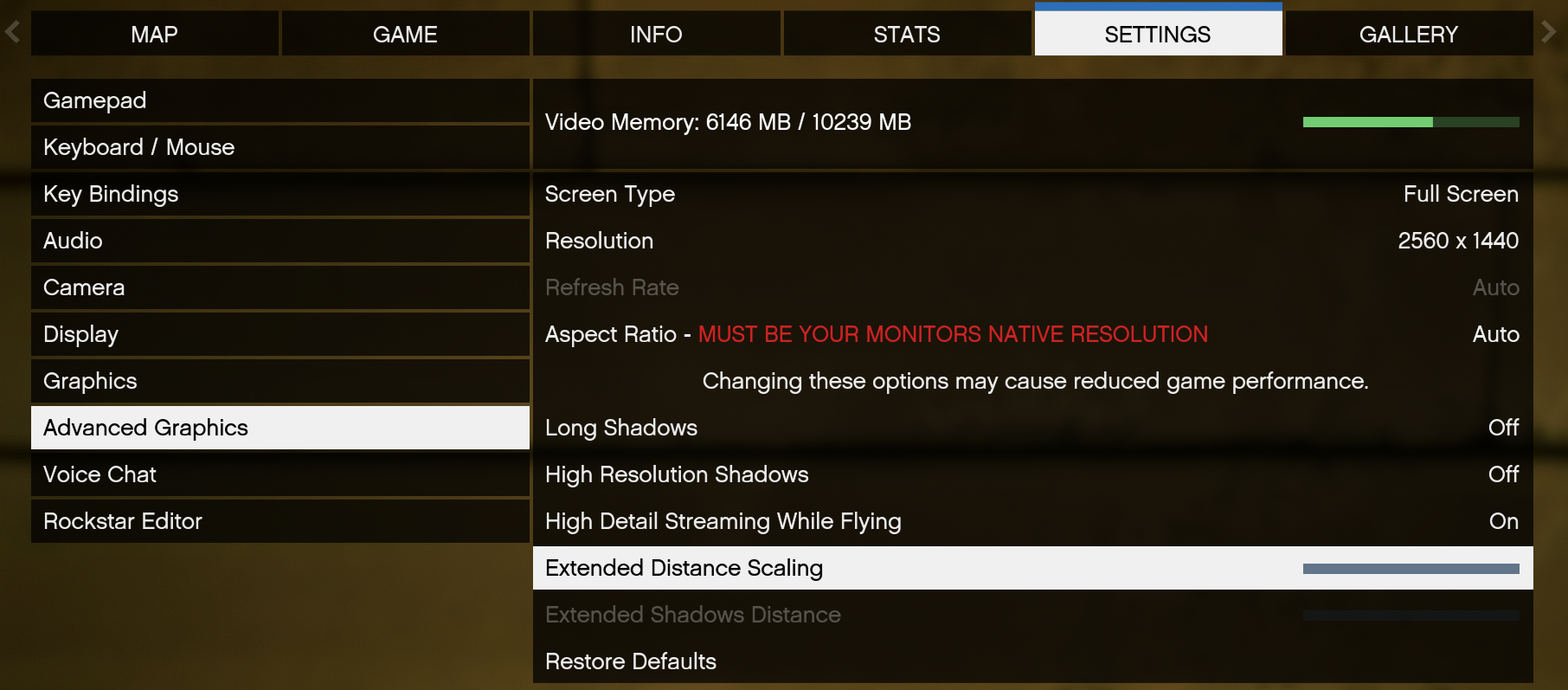
## Turn off "Extended Distance Scaling"
1. Once inside Fivem Open up the `ESC` Menu and navigate to the `SETTINGS` page.
2. Once inside the `SETTINGS` page navigate to the `ADVANCED GRAPHICS` page and click on it.
3. When in the `ADVANCED GRAPHICS` page you will find `Extended Distance Scaling`.
4. Then lower it all the way to turn it off.
## Sitemap
See the full [sitemap](https://fatduckgaming.com/sitemap.md) for all pages.